
How to Make an AI Prank Video from a Photo (Step by Step)
Updated 2026-10-01
Here's how to make an AI prank video from one photo: pick a prank template in AI Prank, add a clear selfie, and the AI turns it into a short video, usually in about a minute. No filming, no editing, no green screen. This guide covers the exact steps, photo tips for better results, prompt ideas for custom pranks, and how to reveal the joke so everyone laughs.
Quick answer: Open AI Prank, pick a template, add one clear, well-lit photo, wait about a minute while the AI generates it, then save or share the MP4. You get free credits to start plus daily free credits. Always reveal it's AI once the laugh lands.
What you need
- An Android phone (for now). AI Prank is live on Google Play. The iPhone version is coming soon.
- One photo. A selfie or any photo from your camera roll. No video needed.
- Credits. New users get free credits to start, and a daily reward with streaks adds free credits every day.
- About a minute. Most videos are ready in about a minute. Sometimes it takes 1 to 3 minutes.
- No account needed to try. Sign in with Apple or Google, or tap Continue as Guest.
Step 1: Pick a prank template
Templates are ready-made pranks. Each one already knows what should happen in the video, so you don't have to write anything. AI Prank has 60+ templates in 6 packs, and new ones are added regularly:
- Halloween & Scary: your friend's face slowly rots into a snarling zombie in Zombie Mode.
- Busted! Caught on Camera: a police officer steps up behind them and takes them by the arm in Arrest Cam, or security-cam footage catches them clutching a pack of raw chicken in Caught Red-Handed.
- Stadium & Football: teammates hoist them onto their shoulders, trophy in hand, in Trophy Lift.
- Funny Transformations: a monkey swipes their hair off in Gone Bald, they pull their shirt up to show a six-pack in Gym Gains, or an older version of them walks in and stands beside them in Future Me.
- Rich & Famous: fake-flex templates like Private Jet and Mansion Tour.
- Absurd & Weird: a giant shark bursts out of the water behind them, jaws wide open, in Shark Attack.
Pick for the person, not the trend. The gym friend gets Gym Gains. The one who's proud of their hair gets Gone Bald. The one who still talks about their single Sunday league goal gets Trophy Lift. The better the fit, the bigger the laugh.
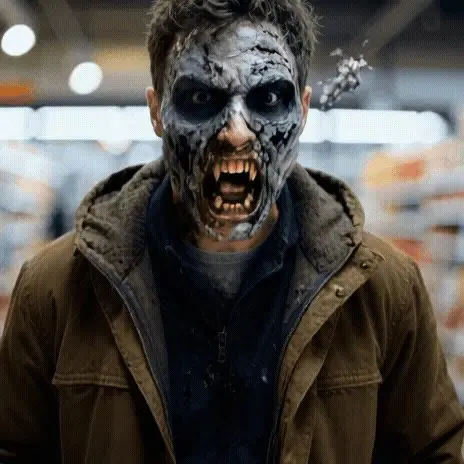
AI Zombie Video
Cuts spread across your face until you go full zombie.
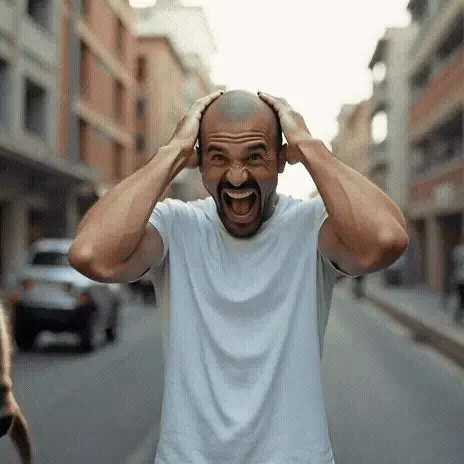
AI Bald Filter Video
A monkey swipes your friend's hair off. Their face says it all.
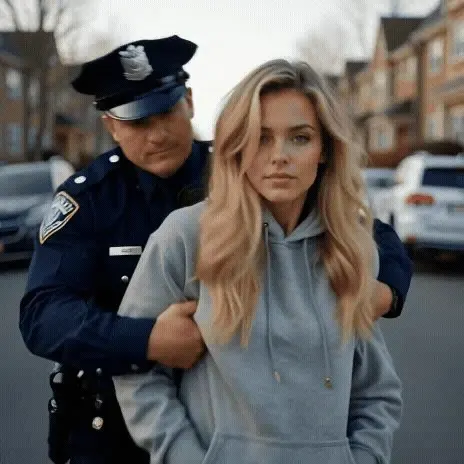
Fake Arrest Prank Video
An AI cop walks up and leads your friend away. From one photo.
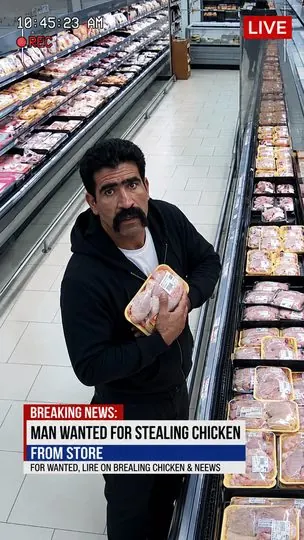
Fake CCTV Footage Prank
Grainy store CCTV catches your friend clutching a pack of raw chicken.
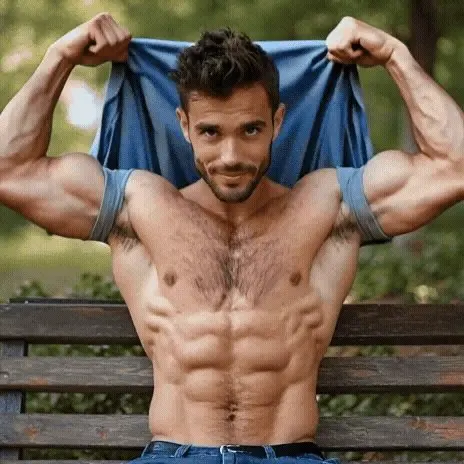
AI Muscle Video
Shirt comes off, six-pack and biceps show up. Instant gym results.

AI Trophy Lift
From business suit to champion on your teammates' shoulders.
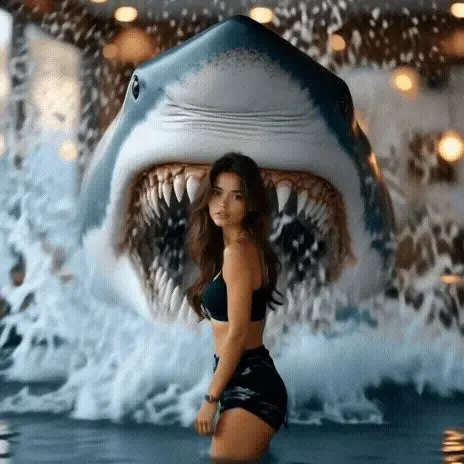
AI Shark Attack
A calm portrait, then giant jaws burst out of the water behind them.

AI Aging Video
Your older self walks into frame and poses right beside you.
Step 2: Add a clear photo
Whether you want a prank or just a funny AI video from a photo, the photo is the biggest factor in how real the result looks. The AI animates what it sees, so give it a clean starting point.
- Use a clear, well-lit photo. Daylight or a bright room beats a dark bar. Blurry, grainy or heavily filtered photos can lead to blurry, uncanny results.
- Show the whole face. No sunglasses, no hand over the mouth, no hair covering the eyes. Facing the camera works best.
- One person only. In a group photo, the AI may not know who the prank is about. Crop to one person first. The exception: the Duo and Morph models in the Custom tab take two photos.
- Leave some body in the frame. For templates that move the whole body, like Gym Gains or Arrest Cam, a waist-up photo usually gives the AI more to work with than a tight face crop.
- Only use photos of people who'll laugh. Your own face, or a friend who's in on the fun.
Step 3: Generate the video
Start the generation and let the AI do the work. It usually takes about a minute, sometimes 1 to 3 minutes. You get a short MP4 video, usually 5 to 10 seconds long, in HD (720p on templates).
Not happy with the result? Try again with a sharper, brighter photo, or pick a different template. Better light or a straighter angle can fix an odd-looking face.
Step 4: Save or share it
Save the video to your phone or share it straight to WhatsApp, TikTok, Instagram Reels, YouTube Shorts and more. A few ways to land it:
- Group chat: drop it in with a deadpan caption like "wait, is this you??" and let the chat do the rest.
- Reels and Shorts: with your friend's OK, post the original photo first, then the video. The transformation is the punchline.
- Let it play. Don't explain before they watch. The twist needs a few seconds to land.
Step 5: Reveal it's AI and keep it funny
A good prank ends with everyone laughing, including the person in the video. Ground rules:
- Reveal it's AI. Once the reaction lands, tell them it's an AI video. Every video from AI Prank is AI-generated.
- Prank people who'll laugh. Close friends and family with a sense of humor, not strangers.
- Keep it out of trouble. Don't send fake arrest or caught-on-camera videos to bosses, teachers, the police or anyone who might act on them.
- Skip anyone who'd be truly scared or upset. Horror templates are for friends who love Halloween, not for someone who frightens easily.
- Ask before posting publicly. A group-chat joke is one thing. A public TikTok with someone's face is another.
- Never use it for money or harassment. No fake emergencies, no asking for money, no targeting the same person over and over.
About the watermark: Free downloads and shares carry a small "AI Prank" watermark. Premium removes it. The watermark also does you a favor: it shows the video is AI-made, which makes the reveal easy.
Start with free credits. Get AI Prank on Google Play and turn one photo into a prank video.
 App Store · coming soon
Make a custom AI prank video with the Custom tab
Templates are fast. The Custom tab is for when you have your own idea. You upload a photo, type what should happen, and pick the AI video model that renders it.
- Open the Custom tab.
- Upload your photo (two photos for Duo and Morph).
- Type your idea as a short prompt: who does what, and how the camera sees it.
- Pick a model and generate.
Which AI model should you pick?
- Pixverse: fast and versatile. A good place to start for most ideas.
- Hailuo: smooth, cinematic motion. Nice for slow, dramatic reveals.
- Grok: creative and bold. Try it for weird, over-the-top ideas.
- Seedance: sharp detail and longer videos. Pick it when the prank needs time to build.
- Kling: ultra-realistic motion. Try it when the joke depends on looking real.
- Duo: two people in one scene, from two photos.
- Morph: turns one photo into another, from two photos.
Custom videos run 5 to 10 seconds, depending on the model.
5 prompt ideas for photo-to-video pranks
- "The person slowly turns into a zombie and smiles at the camera."
- "Security camera footage: the person sneaks a cookie from a jar, freezes, then stares straight into the lens."
- "A golden retriever jumps into the frame and licks the person's face while they laugh."
- "The person's head slowly inflates like a balloon, then floats up and out of the frame."
- "The person turns into a stone statue from the feet up, then winks at the camera."
Prompt tips that make a big difference
- One clear action. 5 to 10 seconds fits one event, not a whole story.
- Describe motion, not just looks. Words like "slowly turns", "freezes" and "jumps into the frame" tell the AI what to animate.
- Name the camera style. Security camera, shaky phone video or slow zoom each change the whole vibe.
- Say what stays the same. Adding "keep the face and clothes the same as the photo" helps your friend stay recognizable.
- Go absurd, not mean. The funniest custom pranks are impossible, not humiliating.
Is AI Prank a free AI prank video generator?
Yes, you can start free. AI Prank is free to download, new users get free credits to start, and a daily reward with streaks adds free credits every day.
If you make a lot of videos, optional weekly premium plans add weekly credits and remove the watermark. One-time credit packs are there too if you'd rather not subscribe.
Troubleshooting: when the result looks off
- The face doesn't look like them. Use a sharper, front-facing photo in good light with nothing covering the face.
- The prank hit the wrong person. Crop the photo so only one person is in it.
- The movement looks strange. In the Custom tab, cut the prompt down to one action, or try another model, like Kling for realistic motion or Hailuo for smoother movement.
- It's taking a while. Generation usually takes about a minute but can take 1 to 3 minutes.
Turn one photo into a prank video in about a minute. Download AI Prank free on Google Play.
App Store · coming soonHow to make an AI prank video for TikTok
On TikTok, the prank clip is only half the joke. The other half is the reaction. Here's how to put both together and keep your friend on your side:
- Make the clip. Pick a template that fits your friend and generate it from their photo in AI Prank.
- Send it privately first. Drop it in the chat with a straight-faced caption and screen-record the replies as they roll in.
- Reveal, then ask. Tell them it's AI, and only post the clip or their reaction if they say yes.
- Share it from the app. Send it straight to TikTok, or save the MP4 and post it together with the chat recording.
- Label it as AI. Say so in your caption and turn on the platform's AI-generated content label if it offers one.
The same steps work for Instagram Reels and YouTube Shorts.
Frequently asked questions
How do I make an AI prank video from a photo?
Open AI Prank, pick a prank template, add one clear photo, and let the AI generate the video, usually in about a minute. Then save it or share it to WhatsApp, TikTok, Instagram Reels or YouTube Shorts.
Is there a free AI prank video generator?
Yes. AI Prank is free to download, with free credits to start and daily free credits. Free videos carry a small "AI Prank" watermark, and optional premium plans remove it.
What kind of photo works best for an AI prank video?
A clear, well-lit photo of one person with the face fully visible. For templates that move the whole body, a waist-up photo usually works better than a tight close-up.
Can I type my own prank idea instead of using a template?
Yes. In the Custom tab you upload a photo, type your idea and pick a model: Pixverse, Hailuo, Grok, Seedance, Kling, Duo (two people in one scene) or Morph (one photo into another).
Is AI Prank available on iPhone?
Not yet. The iPhone version is coming soon. On Android, AI Prank is available now on Google Play.
What happens to the photos I upload?
Photos are used only to create the videos you request. They are never sold and not used to train AI models, and everything is deleted when you delete your account in the app.
How do I make an AI prank video for TikTok?
Make the clip in AI Prank from one photo, send it to your friend privately and screen-record the reaction. Once they're in on the joke and happy for it to go public, share the video to TikTok and label it as AI.
Can I put two people in one AI prank video?
Yes. In the Custom tab, choose Duo, add one photo of each person and describe the scene. Templates take a single photo and usually work best with one person in it.